

Familiar
Your own music, on your own server, in real apps. Familiar listens to every track you own and builds playlists from how the music actually sounds.
v0.2.0-beta7 · 2026-09-20Docker 24+ · 2 GB RAM · x86_64 or ARM64 · MIT licensed
Install Familiar See what it does
macOS, Windows, Synology, OpenMediaVault or Linux — about ten minutes
Already running Familiar? Get the apps


Both need a Familiar server to connect to. The Mac app needs macOS 14.4 or later.
What it does
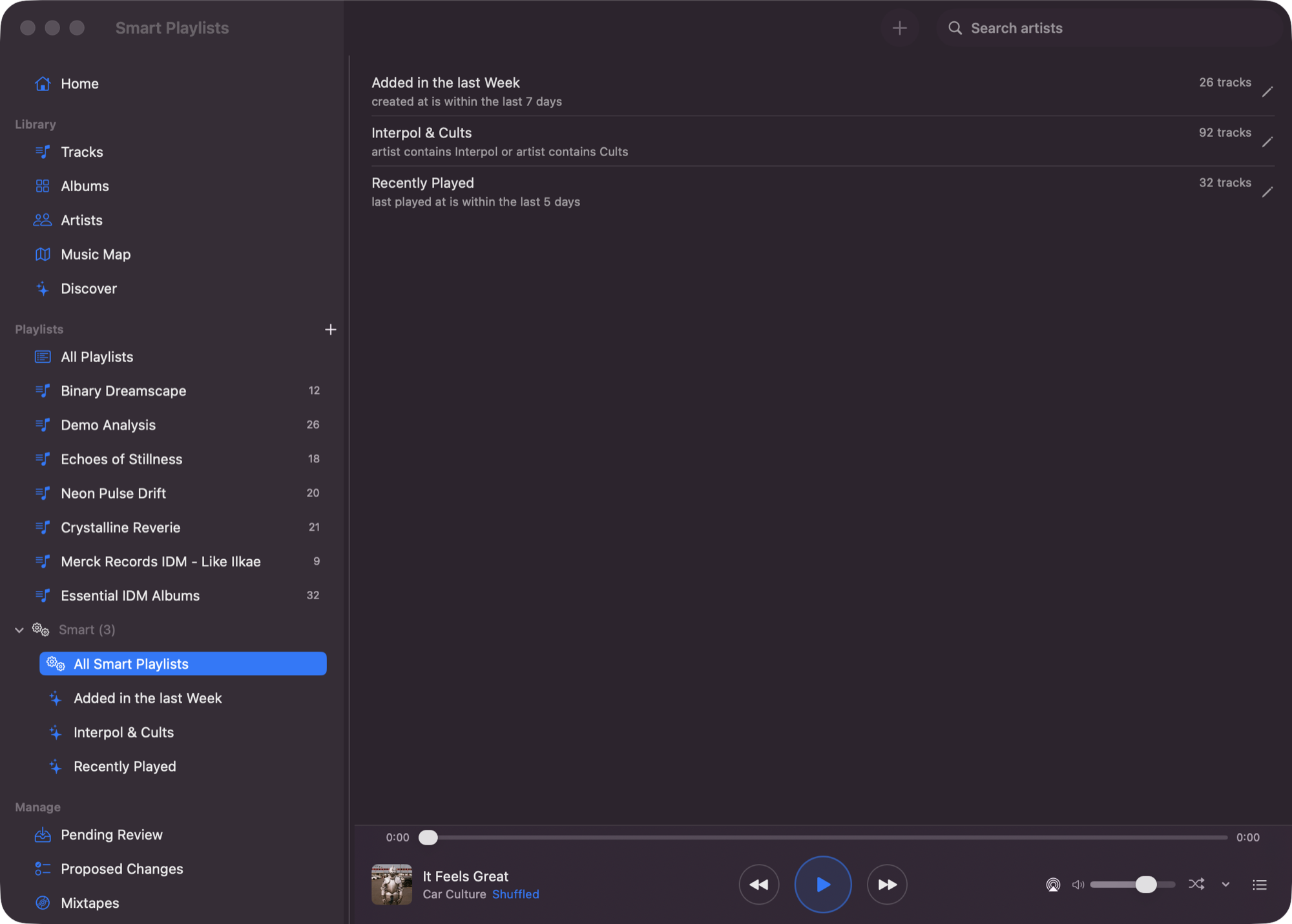
Make a playlist from anything
Right-click a track, an album, an artist — or a handful you have picked out — and Familiar builds a playlist around it, scored from how the music actually sounds. No prompt to write, no model to pay for, no API key anywhere.
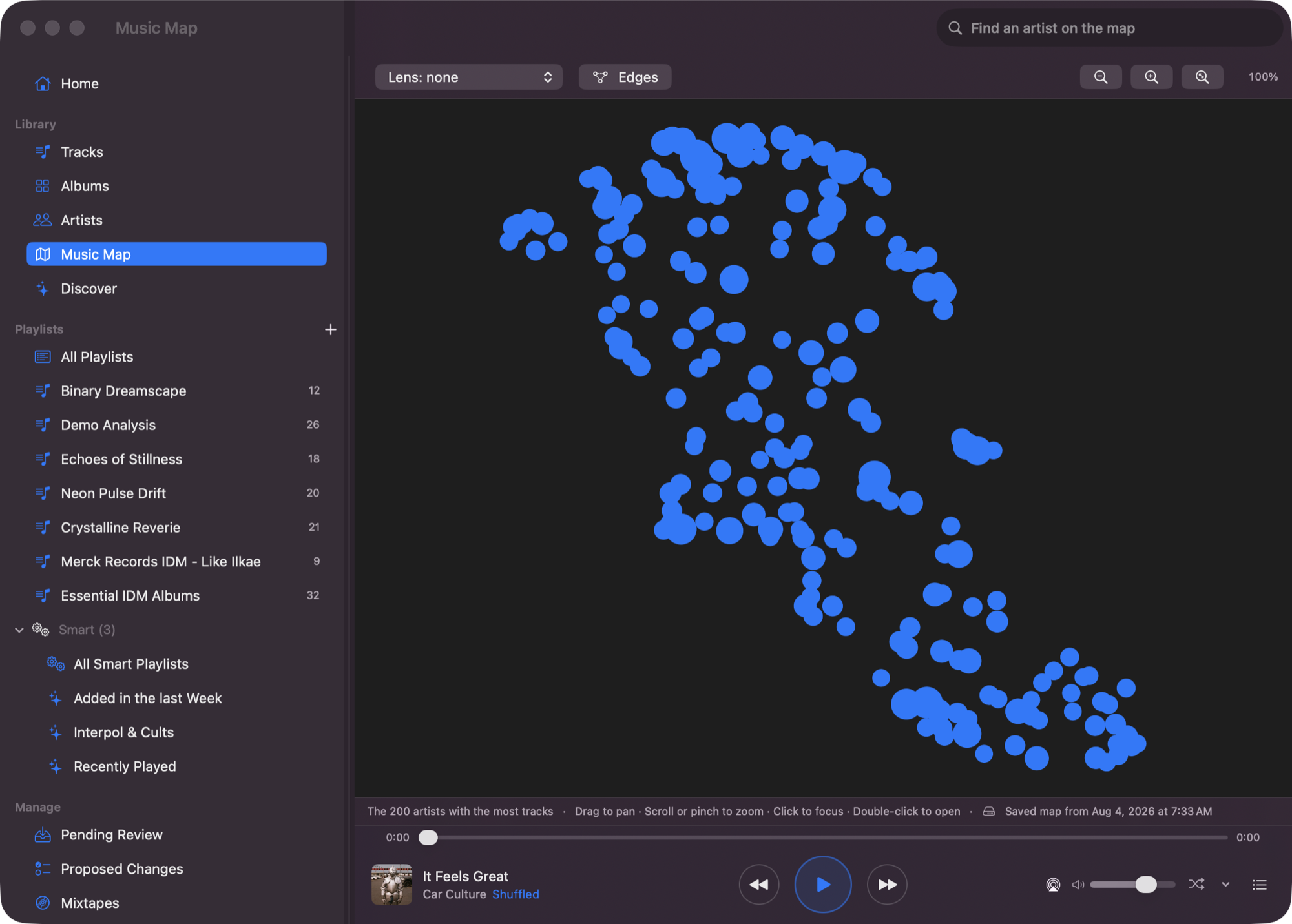
Real apps for the Mac and the phone
Background audio, lock-screen controls, offline downloads, CarPlay, radio that keeps going when the album ends. Your library by album and artist, and a map of it laid out by how things sound.
Or ask for it in words
Familiar speaks MCP. Point Claude Desktop, or any MCP host, at your library and it gets 36 tools for search, playback, metadata and playlists — searching the audio itself, not the tags.
“Something chill for late-night coding”energy < 0.4 · valence 0.3–0.6
“Beatmatch-safe house set”tempo_cv_max = 0.05
Familiar holds no API key and calls no model. Whatever you connect is your account and your choice.
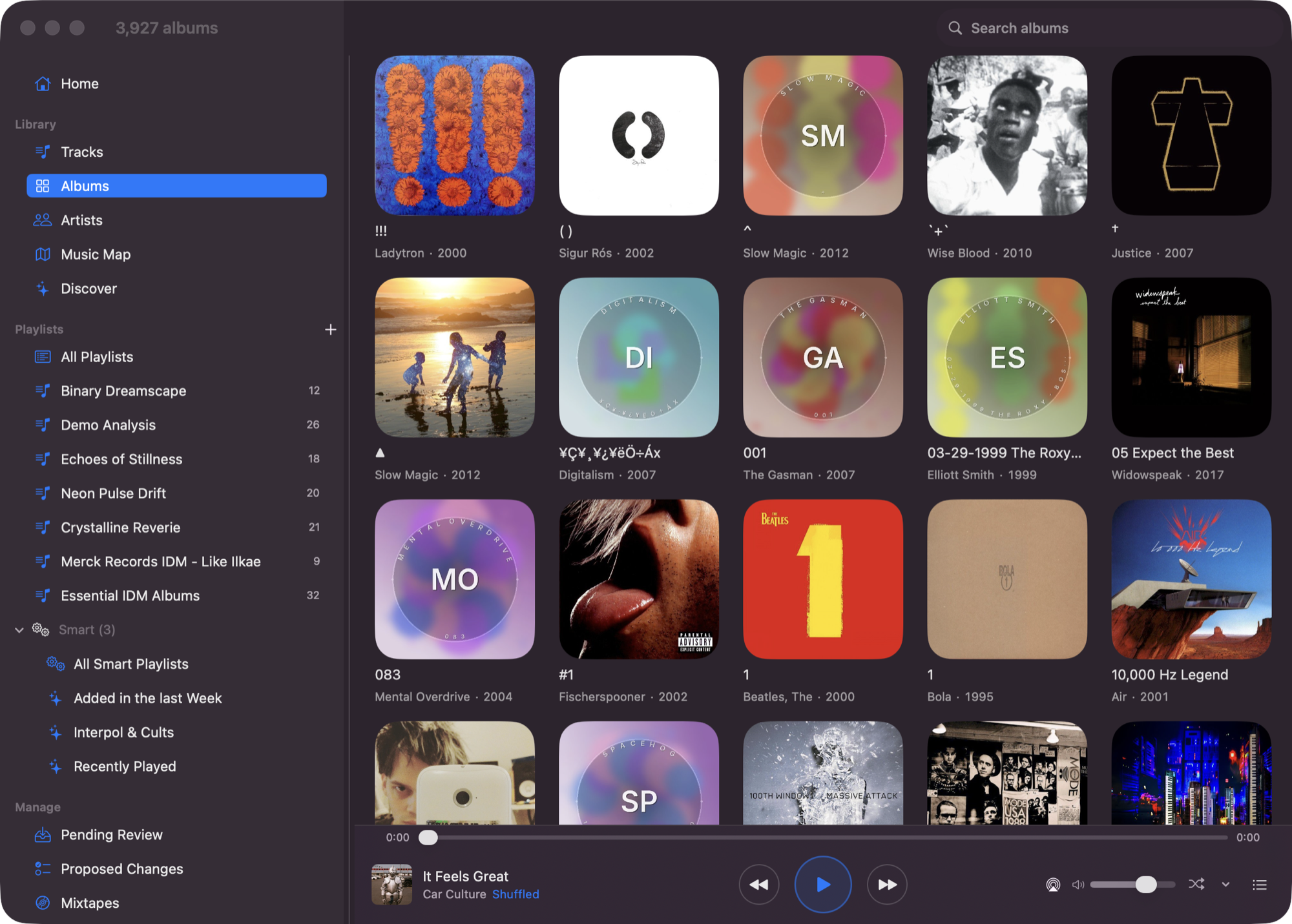
It looks after the library
Familiar scans your files, works out which artists and albums are really the same one, fetches the artwork, and analyses every track. Fixes you make stick — a re-scan will not undo them. Your files are never moved or rewritten.
Also included
- Discover — new releases from artists already in your library
- Smart playlists — rules over tags, audio features and listening history
- Find similar — surface sonically close tracks from any song
- Musical features — BPM, key, energy, danceability, acousticness
- Community cache — opt-in, skips hours of analysis on a new library
- Web app for setup — scanning, analysis, backup, Last.fm, diagnostics
How Familiar compares
| Familiar | Jellyfin | Plex | Apple Music | Spotify | |
|---|---|---|---|---|---|
| Plays your existing MP3 / FLAC files | Yes | Yes | Yes | iCloud Match (may replace with catalog version) | Local Files — MP3 only, same Wi-Fi |
| MCP server (bring your own AI) | Yes | — | — | — | — |
| Search by describing the sound | Yes (CLAP) | — | — | — | — |
| Audio feature analysis | BPM, key, energy, mood | Basic | Sonic analysis (Plex Pass) | Catalog-only | Catalog-only |
| Community analysis cache | Yes | — | — | — | — |
| Self-hosted / no cloud | Yes | Yes | Partial | — | — |
| Smart playlists | Rules-based | Community plugin | Yes | Yes | — |
Competitor capabilities checked against each product's own documentation on 2026-08-16. They change; if something here is out of date, tell us.
Install
Memory is the thing to check. Familiar runs happily in 2–4 GB, but the model that listens to your music peaks at about 4 GB on its own, so a machine with 8 GB or less — most NAS boxes, and a Raspberry Pi — needs
DISABLE_CLAP_EMBEDDINGS=true. You keep the whole library, the tags, BPM, key, energy and mood, and smart playlists; you lose the features that compare how tracks sound, which includes Find Similar and suggested tracks. It can be turned on later if you move Familiar to a bigger machine.
Start Familiar on your server
macOS
You will use Terminal for two commands. Everything else is Finder and a browser.
- Install Docker Desktop and open it once, so it is running.
- Download the Familiar folder, unzip it, rename it to
familiarand drag it into your home folder. - Open Terminal and set up your settings file:
cd ~/familiar/docker
cp .env.example .env
open -e .env
In the file that opens, put your music folder after
MUSIC_LIBRARY_PATH=. To get the path, drag the folder from Finder into the Terminal window and copy what appears. If your Mac has 8 GB of memory, addDISABLE_CLAP_EMBEDDINGS=trueon its own line. - Start it:
./start.shThe first run downloads about 7 GB and only happens once. The script checks your settings and handles the Mac-specific logging setting for you.
Installing Familiar on your Mac — the same steps at length, with every menu named.
Windows
You will use PowerShell for two commands.
- Install Docker Desktop, keeping the WSL 2 option it offers, and open it once.
- Open PowerShell and download three small files:
mkdir familiar; cd familiar curl.exe -LO https://raw.githubusercontent.com/seethroughlab/familiar/main/docker/docker-compose.prod.yml curl.exe -LO https://raw.githubusercontent.com/seethroughlab/familiar/main/docker/docker-compose.desktop.yml curl.exe -LO https://raw.githubusercontent.com/seethroughlab/familiar/main/docker/init-pgvector.sqlcurl.exewith the extension, because PowerShell uses plaincurlfor something else. - Start it, with your own music folder in place of the one below:
$env:MUSIC_LIBRARY_PATH="C:\Users\you\Music"
docker compose -f docker-compose.prod.yml -f docker-compose.desktop.yml up -d
The first run downloads about 7 GB.
Installation guide — settings, upgrading and troubleshooting.
Synology
No terminal at all. Everything happens in DSM, in Container Manager.
- Open Package Center and install Container Manager (DSM 7.2 or newer; on older DSM it is called Docker).
- In File Station, make a folder for Familiar's data:
/volume1/docker/familiar. Your music can stay wherever it already lives, for example/volume1/music. - In Container Manager, go to Project → Create. Name it
familiar, set the path to/volume1/docker/familiar, and choose Create docker-compose.yml. Paste the file from the guide below, changing/volume1/musicto your own music folder. - Click Build and wait until every container shows Running.
Synology guide — the compose file to paste, and the list of models this runs on.
OpenMediaVault
No terminal. OMV has a Compose page, and Familiar is one file pasted into it.
- In omv-extras, install the openmediavault-compose plugin, then go to Services → Compose → Settings and enable it. OMV 6 or 7.
- Make a shared folder called
familiaron your data disk, for the database and settings. Your music stays where it already is. - Go to Services → Compose → Files → Add, name it
familiar, and paste the file from the guide below — replacing the/path/toplaceholders with your own folders. - Press Up. The first run downloads about 7 GB.
If Familiar finds no music, it is almost always the shared folder's permissions rather than the path: the container has to be able to read it. The guide below shows the one command that tells you which.
OpenMediaVault guide — the compose file to paste, the HTTPS proxy, and the permissions check.
Linux & NAS
Two files and one command. Also the path for Unraid, QNAP and anything else with a shell.
- Download the two files Docker needs:
mkdir familiar && cd familiar curl -LO https://raw.githubusercontent.com/seethroughlab/familiar/main/docker/docker-compose.prod.yml curl -LO https://raw.githubusercontent.com/seethroughlab/familiar/main/docker/init-pgvector.sql - Start it, pointing
MUSIC_LIBRARY_PATHat your music:MUSIC_LIBRARY_PATH=/srv/music docker compose -f docker-compose.prod.yml up -dPulls the multi-arch image from
ghcr.io/seethroughlab/familiar:latest. Nothing is built locally.
Installation guide — settings, upgrading and troubleshooting.
Open it in a browser
Visit http://localhost:4400 — or http://your-nas-address:4400 if Familiar is on another machine. Familiar needs no account, and no AI key of any kind. Last.fm and AcoustID are optional, and only fetch extra information about your music.
Point it at your music
Go to Settings → Library Management and choose your music folder. Familiar reads your files where they are — it never moves, renames or rewrites them.
Build from source instead
git clone https://github.com/seethroughlab/familiar.git
cd familiar/docker
cp .env.example .env
docker compose -f docker-compose.prod.yml build
Useful when you're developing against the backend. Note that ./start.sh does not build — it pulls the published image, detects macOS and adds the logging override, then health-checks the stack.
Detailed guides
- Installation GuideDocker, OpenMediaVault, Synology, dev setup
- macOS GuideDocker Desktop, Apple Silicon, library paths
- ConfigurationEnv vars, API keys, Tailscale HTTPS, backup
- Library BrowsersBuild custom 2D/3D visualizations
- REST APIBackend API reference
Listening away from home

On your own network, Familiar just works — open the app and it finds your server. Getting to it from a train is a different question, and worth understanding before you do it.
Use Tailscale
Tailscale puts your server and your phone on a small private network of your own. Nothing is exposed to the internet, there is no router setting to change, and it works on cellular. Install it on the server and on each device you listen with, turn on HTTPS certificates in the admin console, then run one command on the server:
tailscale serve --bg https / http://localhost:4400Your apps then use https://<server>.<tailnet>.ts.net, with a certificate that renews itself. This is the setup Familiar is developed against.
If you would rather not
Cloudflare Tunnel and WireGuard both work, and are covered in the FAQ. One warning worth reading twice: a reverse proxy is only a boundary if it asks for a password. Putting nginx or Caddy in front of Familiar without authentication does not protect it — it publishes it, through nginx. Given there is no login behind the proxy, that is the whole of the security.
Adding real authentication to Familiar is a decision already taken and not yet built. When it ships, this page changes.
Get started
One compose up against the music you already own.